en

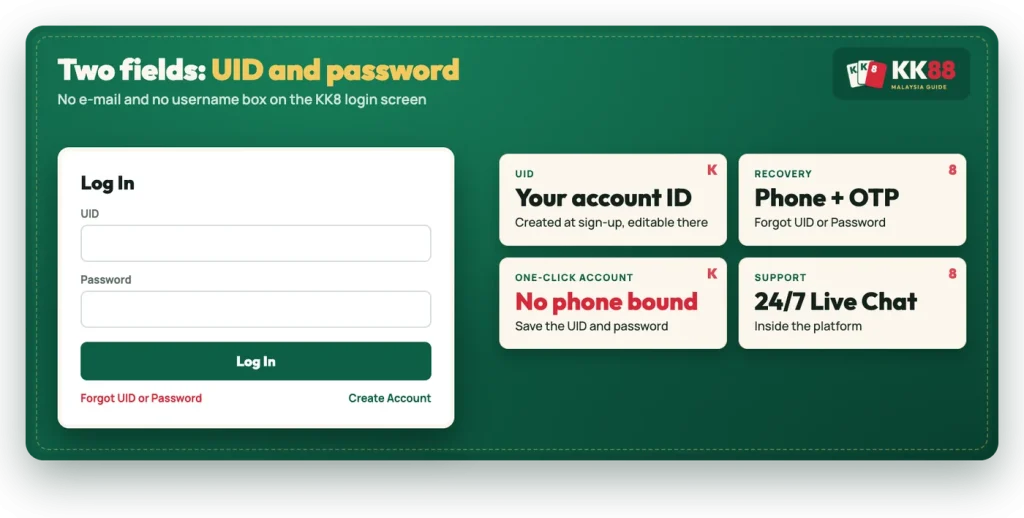
If you searched KK88 login, the account you are trying to reach belongs to the platform spelled KK8. The extra 8 slips in easily, because the name is short and already full of eights. Nothing about your account changes: you sign in with your UID and a password, on one login screen, and that same screen holds the recovery links if either one is lost.
The sign-in form asks for two things only: your UID and your Password. Under them sits the Log In button, a Forgot UID or Password link, and Create Account for anyone who has not registered yet. There is no e-mail field on the login screen, so a UID is what you type even if you signed up with an address.
A UID is the account identifier the platform generates for you at registration. On the account details screen at sign-up you can either keep the generated UID and password or tap Edit and set your own, then save both to your phone with Save UID and Password. The screen itself reminds you not to forget them, and a saved copy is the easiest recovery you will ever have.
If you have never registered, start instead by choosing a method and a region, then open a new account with one-click, phone or e-mail.
| Detail | KK8 |
|---|---|
| Login fields | UID and password |
| Recovery channel | Registered phone number plus OTP |
| Change password | Profile > My Account > Change Password |
| Support | 24/7 Live Chat inside the platform |
| Minimum age | 18 and above |
Searches like KK88 casino login or a plain KK88 log in read as if the casino and the slot sections had separate doors. They do not. The platform runs as a single mobile web app, so one UID and password sign you in, and the lobbies, the bottom bar, Check In, the VIP Club and the side menu all sit behind that one sign-in. The same goes for the kk888 login spelling, which is the same search with one more eight attached.
Signing in from a phone uses the same form in the browser, since the platform is built as a mobile web app rather than a store download. If you want it behaving like an icon on your home screen, the routes for Android and iPhone are covered on the app on your phone.
A forgotten UID is recoverable as long as a phone number is attached to the account. The flow runs through the same Forgot UID or Password link on the login screen, and it ends with the UID on screen next to a copy icon, ready to paste into the form.
If the list shows several UIDs, the right one is the account whose password you know. Note that the terms allow one account per person, and accounts cannot be transferred or sold, so this is not a place to shop around between identifiers.
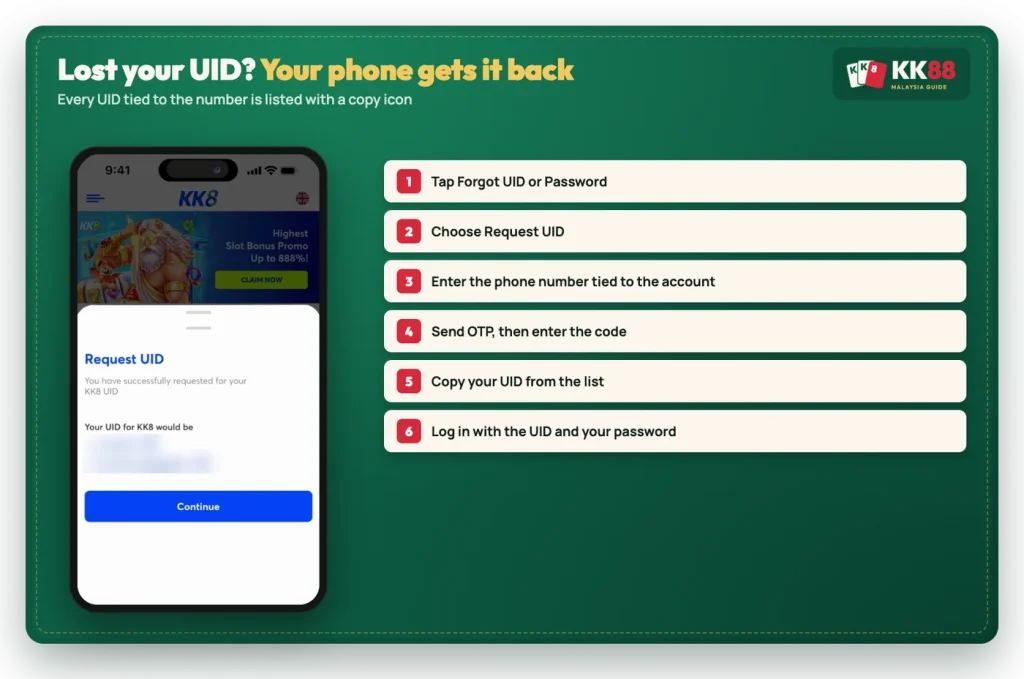
A forgotten password starts from the same Forgot UID or Password link. You confirm the registered phone number, receive an OTP, enter it, and then set a new password. In both branches the phone number plus the code is what proves the account is yours, so the number on file matters more than anything else you remember.
Keep in mind
An account created with the one-click method has no phone number bound to it at sign-up, so OTP recovery has nothing to send a code to. Until you add a number, the UID and password shown on the account details screen are the only key to that account. Save them the moment they appear, and bind a phone before you need it.
Two fields and a button is the whole login. If you have your UID and password to hand, go straight in.
Once you are signed in, a password change takes a few steps in the account area. Open Profile, then My Account, then Change Password. You enter the current password, type the new one twice and tap Submit, and the screen confirms with Password Changed.
This is the route to use after any login scare, for example if you typed your details into a page you were not sure about. It is also the sensible follow-up to a reset, since a password you chose yourself is easier to keep than a generated one.
Sign-in trouble can start before the account: with the address. Searching with an extra letter or digit can land you on a page that merely imitates a familiar sign-in form, and a copied form is easy to build. Before you type anything, check that the address is one you recognise, and remember that a password or an OTP typed into the wrong page is handed over, not checked.
Two habits cover the rest. First, no legitimate support agent asks for your password or your OTP in a chat app, in a comment or over a call, however official the greeting sounds. Second, support lives inside the platform: 24/7 Live Chat is reached after you open it, not through a third-party channel that found you first. For more on the spelling itself, where the search leads takes two minutes to read before you sign in anywhere.
After the login screen, orientation is simple. The Profile menu holds your profile details, Change Password, Transaction History and Withdrawal Details, while the General group underneath carries Code Redemption for promo codes, Contact Us for Live Chat and Language for switching the interface. The bottom bar covers Promotion, Check In, Home, History and Profile, and the side menu adds Events, the VIP Club, 4D Results, Sports Live Stream, Mini Games, the Sponsor page and the User Guide.
One housekeeping point. Registration is limited to players aged 18 and above, and the platform may ask for identification and proof of age, so the details on the account should be your own and accurate from the start.